White Paper
1.8 GHz Upgrades
White Paper Provided by CCI Systems
Introduction
A common upgrade plan today is to go to a 1.2 GigaHertz (GHz) High-Split system that is “drop-in” upgradeable to 1.8 GHz Ultra-Split in the future. While the traditional design math calculations might be easy (amplifier spacing, cable losses, upstream and downstream tap levels, and modem operating levels), there are several other important factors that must now be considered to ensure a smooth transition to 1.8 GHz in the future without discovering later that you have inadvertently built a bunch of problems into the upgrade. This paper is a high level discussion of those challenges.
What is Proactive Network Maintenance (PNM) and what does it mean?
First, let’s start by defining Proactive Network Maintenance (PNM). In a Proactive Network Maintenance environment Green, Yellow, and Red conditions are typically used to indicate the health and performance status of the network and its components. Here's a breakdown of what each color generally signifies:
- A Green Condition indicates optimal network performance. All key performance indicators (KPIs) are within acceptable ranges, no significant issues are detected, and no immediate action is required.
- A Yellow Condition indicates potential issues or warnings. Some KPIs are approaching thresholds that could lead to performance degradation. This might include minor signal impairments or increased error rates, and these conditions should be investigated and repaired before they become more serious.
- A Red Condition indicates critical network issues, where KPIs have exceeded acceptable thresholds, leading to significant performance degradation, high bit error rates, or possible outages, and immediate intervention is required to resolve issues.
It is important to understand the conditions and performance numbers in today’s plant will not be the same after you upgrade to 1.2 GHz and eventually 1.8 GHz. In addition to this, knowing the current condition helps understand the need for plant and customer premises health.
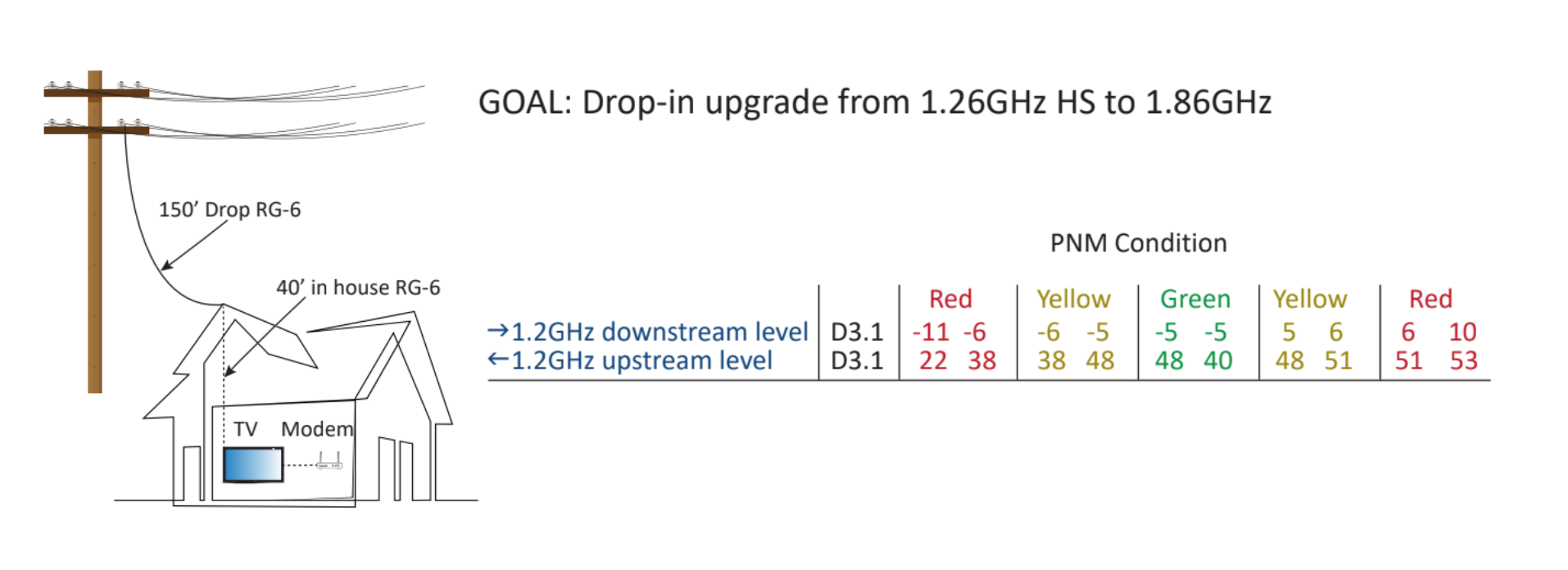
This is why it is critical that with this type of upgrade, both the 1.2 GHz and 1.8 GHz scenarios are designed and built to a Green PNM Condition, which provides an ideal baseline for performance. Subsequent changes in the PNM condition can then be more easily isolated, identified, and corrected.
Proactive Network Maintenance (PNM) Importance: PNM uses Green, Yellow, and Red conditions to indicate network health, with Green representing optimal performance. Both 1.2 GHz and 1.8 GHz designs should aim for a Green PNM condition to provide a reliable baseline and ease troubleshooting.
Go in with a detailed and well thought out plan
Define today’s vs tomorrow’s plan: What will be your downstream bandwidths and upstream/downstream split plan? A very important question is how much extra cost will you be willing to invest into the 1.2 GHz upgrade in order to make migrating to 1.8 GHz easier in the future?
Which PNM conditions do I want at 1.2 GHz and at 1.8 GHz? A Green condition is always the most desirable, but it has a very narrow window of operation and can be costly to achieve at 1.8 GHz. Yellow PNM conditions can also work with a slightly larger window and less cost, but do not operate to the high level of performance that Green does. Red PNM conditions are to be avoided and could be a constant source of trouble calls. A common mistake is to design the 1.2 GHz plant to a green PNM condition, only to have it go to red after the 1.8 GHz upgrade. Careful spectrum planning needs to happen to avoid this.
The reason why we focus on a color scheme that is relatable to PNM, is due to the fact that as you are make changes to the system (A.K.A. hardline), you are also making changes to the standards and equipment used to provide new services. So, what works today is not necessarily going to work tomorrow. Examples are represented below:
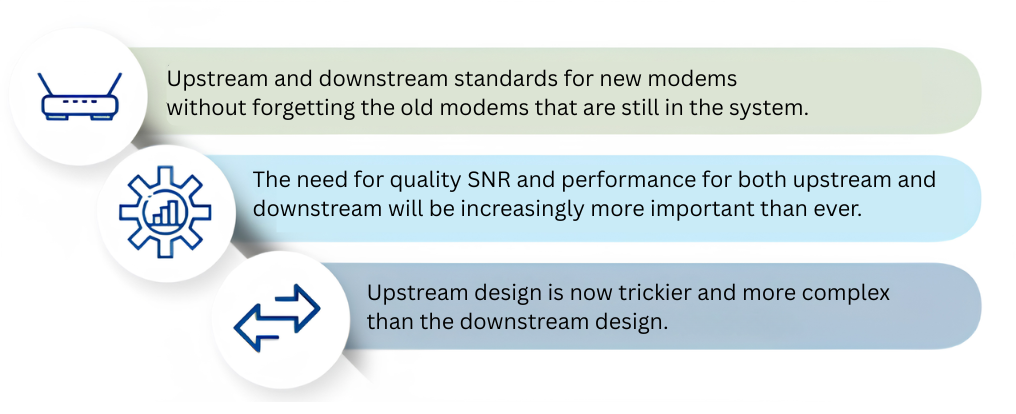
In short, depending on your operational standards today, it is imperative to make sure that you are taking all considerations of the existing plant and how it operates today and work in the new expectations of what you want your system to do and how you want it to perform tomorrow to be able to provide that smoothest transition to your plant of the future.
This calls for a detailed and well-laid out plan that is custom to each customers and service providers need. It is not uncommon to have several variations of this for the same service provider due to their deployment areas. Concerns on existing plant services is to focus on plant health with PNM first prior to starting the design.
Why is this important?
Knowing that plant issues exist today is one concern, but more importantly, with any upgrade, you are heading into uncharted spectrum space for both upstream and downstream. An example of the wrong approach would be to swap out amplifiers and potentially triple your issues overnight, due to:
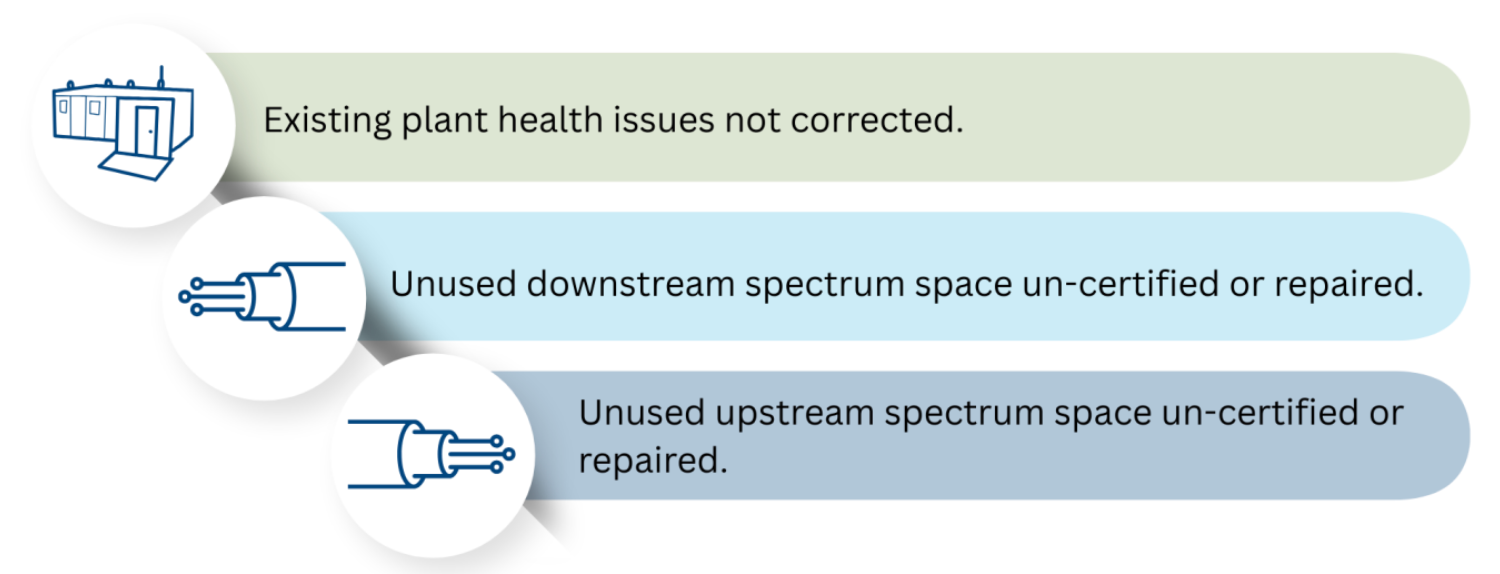
Imagine doubling the amount of truck rolls over night, which will drive your operational cost sky high and customer satisfaction to decrease, this is why amplifier operating levels and tap levels at 1.2 GHz and 1.8 GHz is critical to research and design prior to upgrades. A well designed plan calls for amplifier operating levels at 1.2 GHz that can be adjusted when going to 1.8 GHz in a way that will not require massive amounts of amplifier respacing and tap changes to avoid doubling your labor cost.
Active and passive levels are not the only pitfall, did you plan to remove the in house 2-way splitter when upgrading to 1.8 GHz and DOCSIS 4.0? Splitters are not typically capable of handling spectrum above 1 GHz and the additional concerns on port isolation is a greater concern. This only applies in a mid-split upgrade. If the goal is to have greater upstream speeds, then you need to focus on how, or if you will continue to supply video to your customers.
The splitter will likely no longer be required, but it will be a little more premises work during the upgrade. However, it will make the 1.8 GHz design easier.
Utilizing taps with plug-in values will help both the 1.2 GHz and especially the 1.8 GHz designs easier to design.
Determine the maximum cascade requirements to maintain good network performance. If you want an easy transition to 1.8 GHz, you may need to spend the extra money to design the 1.2 GHz network with 1.8 GHz maximum cascades. If you also plan to upgrade to DOCSIS 4.0, know the requirements.
Addressing existing plant issues: Uncorrected plant health problems, uncertified spectrum spaces, and improper amplifier or tap levels can lead to increased operational costs and customer dissatisfaction post-upgrade. Proper amplifier operating levels at both frequencies are critical to minimize labor and cost.
Know your equipment and what it can do
If you want existing equipment to be reused at 1.8 GHz, it has to be able to pass that bandwidth today. Passive devices such as taps and splitters need to be 2.0 GHz capable in order to work at 1.8 GHz.
Active devices will likely have to be upgraded, but with careful equipment selection, existing housings can be reused and remain spliced to the coaxial cable, and only the interior modules need to be swapped for a bandwidth upgrade. Some manufacturers are now making modules that are switch capable to 1.8 GHz and will only require a diplex change to go from 200 megahertz upstream to an ultra-split. A select few are now doing this same process electronically, so the days of constantly swapping out modules is no longer a concern. As previously mentioned, set top boxes will likely no longer be a viable solution for video and will be removed. Cable modems will likely need to be upgraded and also need to be part of the plan. Depending on the area and customers stability to stay with a provider, the video solution may be the very first thing addressed prior to a field upgrade in order to be able to provide existing services pre and post upgrade.
Not to be overlooked, note that coaxial cable that will pass a sweep test at 1.2 GHz might not be able to pass that same test at 1.8 GHz. Several factors need to be considered prior to design, some of which will require field testing. Testing for the following will validate the capabilities of your system to be able to handle and perform at higher frequencies.
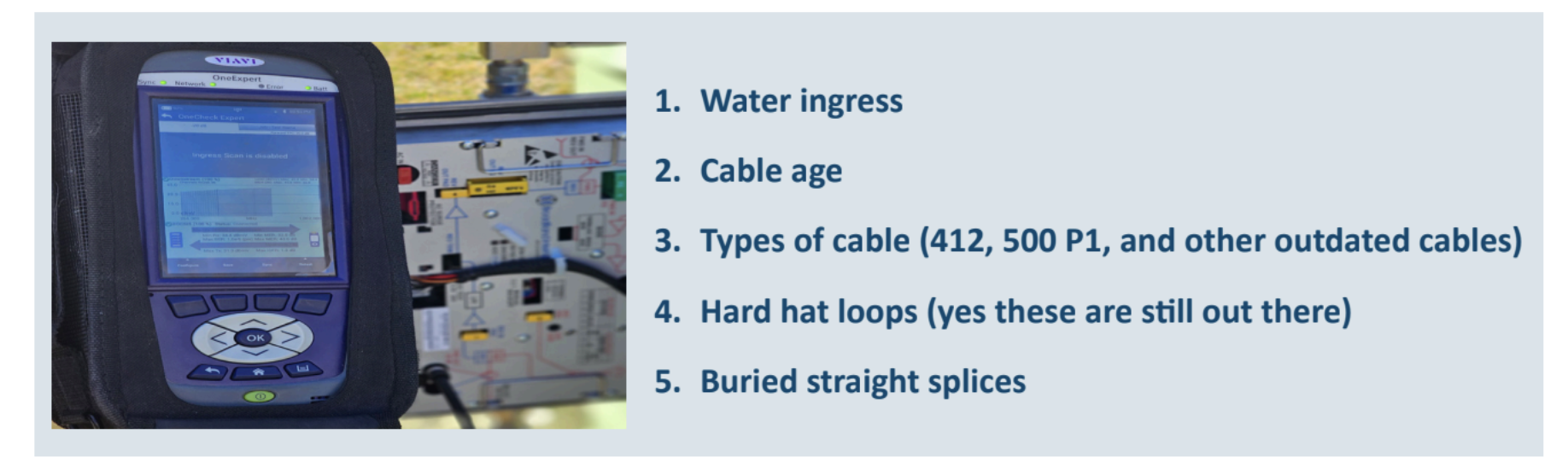
Also note that in theory all of this should work, but in practice some systems are either so old or so overstretched that an easy upgrade to 1.8 GHz is just not possible. Even when the spacing works, it is inadvisable to use older cables like P1 or 0.412” in these kinds of upgrades. Replace them now and save yourself trouble
later. to 1.8 GHz is just not possible.
For this, old-new technology is being used in ways where booster amplifiers are installed vs re-splicing all active locations. This saves customers in the event that the housing will receive a newer module for the new spectrum space and also allow for a booster amp to be installed in locations where inputs are less than nominal.
How are you utilizing the spectrum, and how will it affect your plan?
Downstream PNM numbers on a clean system can range from -8dBmV to +10dBmV at the modem input. However, if you are implementing any of the items listed below, they can have an adverse effect on your network performance, both at 1.2 GHz and at 1.8 GHz. The net effect will be to narrow the green and yellow condition ranges of your PNM window, and your system should be designed accordingly to account for these factors.
Downstream existing system: OFDM channels, channel width, and total power.
- Are you utilizing analog optics? Is there any analog equipment anywhere in your system that you will continue to be using?
- How much space is occupied by Analog and/or digital video
- What are the expected post upgrade upstream and downstream data rates?
Downstream at 1.8 GHz: SC QAM and OFDM channels.
- IP Video still provided?
- DOCSIS 3.0 modems still in the system?
- Is the goal to move to enhanced Docsis 3.1 or Docsis 4.0
Upstream existing system:
- Cascade and noise funneling,
- PHY vs analog optic,
- QAM vs OFDMA,
- MS or HS return?
Upstream at 1.8 GHz:
- High Split, or Ultra Split?
- Cascade reduction to prevent noise funneling restrictions.
- Total spectrum space utilized and power calculations for modem perfromance
Spectrum utilization impact: The presence of OFDM, analog optics, video services, and various DOCSIS standards affects PNM windows and network performance. Upstream design complexities and spectrum space usage must be carefully planned to maintain modem input/output levels and avoid costly plant rework.
For a 1.2 GHz to 1.8 GHz design, the most important parameters to maintain are the input and output levels at the modem itself. If the spectrum is deploying several of the items listed above, the Green PNM condition becomes very narrow and difficult for the system designer to attain without expensive reworking of the plant.
Engineering guidelines
In many cases, operators try to lower the cost of an upgrade by foregoing the walkout if they think their maps are “good enough”. We have found that in the majority of projects, this is not the case. Typical examples are incomplete asbuilt updates that are still sitting in a drawer in the warehouse (if they exist at all), old design maps that do not call out all the equipment properly or note the existence of long drops, and no addresses on the maps (which will be required for permitting). Identify which long drops need to be upgraded or replaced with larger cables. This is critical to attain the narrow PNM windows desired. Any of these things might be discovered in the construction phase, which will result in additional costs and delays.
When designing an upgrade of this type, the 1.2 GHz and 1.8 GHz designs must be calculated simultaneously in order to ensure the compatibility of both designs. Placing equipment in locations that will be an easy drop in at 1.8 GHz may seem very inefficient in a 1.2 GHz design, but these are necessary for an easy transition. The cost savings is realized by not having to re-splice and move actives to other locations. The designing of dual systems allow for like locations for most if not all locations to allow for limited labor to bump from 1.2 GHz to 1.8 GHz.
Construction guidelines
It is also important that the network is constructed as close as possible to the design that is provided, or to consult the designer if changes are required. Construction on-site adjustments which worked well in the past could very well move the initial PNM condition of that part of the network from green to yellow or red.
Diagram
Summary
Upgrading to 1.8 GHz is a complex but critical step in future-proofing cable networks, requiring a comprehensive strategy that accounts for proactive network maintenance (PNM), equipment compatibility, spectrum planning, and construction precision. Achieving and maintaining a Green PNM condition across both 1.2 GHz and 1.8 GHz systems ensures optimal performance and minimizes costly disruptions. Success hinges on detailed planning, including modem and splitter upgrades, spectrum certification, and dual-design engineering that anticipates future transitions. Operators must also validate plant health and avoid shortcuts like skipping walkouts, which can lead to expensive rework. Ultimately, a well-executed upgrade plan not only enhances service delivery but also reduces operational costs and improves customer satisfaction.
About the authors


Jim Chartre brings over 37 years of experience in the broadband and telecommunications industry. He holds multiple SCTE certifications and earned his BSEE from Michigan Technological University. Throughout his career, Jim has delivered numerous technical presentations for SCTE chapters, authored several articles for Communications Technology, chaired two SCTE working groups focused on certification development, and spoken at CableLabs. Jim served on the SCTE Badger State Chapter Board for 25 years, holding various officer roles. In recognition of his exceptional dedication and contributions to the industry, he was elevated to Senior Member of the Society by the SCTE National Board in 2015.
Chad Kay is a seasoned broadband systems expert with over 30 years of experience in HFC and FTTH technologies. He specializes in guiding service providers through system modernization, leveraging deep architectural knowledge to design scalable solutions with minimal operational impact. Known for resolving complex technical challenges, Chad supports engineering teams and clients with strategic insight that drives innovation and efficiency across the broadband industry.
About CCI Systems
CCI Systems delivers end-to-end network solutions for energy, telecom, and municipal clients. With 60+ years and 1,200 experts, we modernize infrastructure, deploy fiber, and integrate systems, helping build reliable, connected communities.